iOS 26.2 Sheet: remove Liquid Glass for small detents
I recently encountered an interesting issue with
UISheetPresentationController in iOS 26.2. When using a
.pageSheet presentation style with a detent of
.medium or smaller, iOS automatically applies the
“liquid glass” background effect, completely ignoring any custom
background settings.
The Problem
In iOS 26.2, Apple introduced changes to the visual appearance of
.pageSheet presentations. When a page sheet does
not take up the entire screen (typically on larger devices
or when content remains visible behind the sheet), iOS automatically
applies a “liquid glass” background effect that overrides any custom
background settings you may have configured.
Interestingly, this issue only occurs when the sheet does not occupy the full screen. When the sheet takes up the entire screen, the automatic liquid glass effect is not applied and custom backgrounds work as expected.
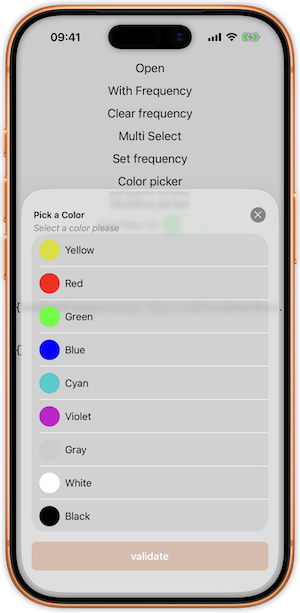
This made my nice page sheet looks like the following :
Initial Attempts
My first instinct was to try setting the background effect to
nil:
if #available(iOS 26.1, *) {
    controller.sheetPresentationController?.backgroundEffect = nil
}
Note that we need to guard the access to this property for 26.1 and later versions.
However, this approach didn’t work - iOS still applied the liquid glass effect.
The Solution
After some experimentation and research, I discovered the solution:
using an empty UIColorEffect():
if #available(iOS 26.1, *) {
    controller.sheetPresentationController?.backgroundEffect = UIColorEffect()
}
This effectively tells iOS to use a solid color background instead of the automatic liquid glass effect.
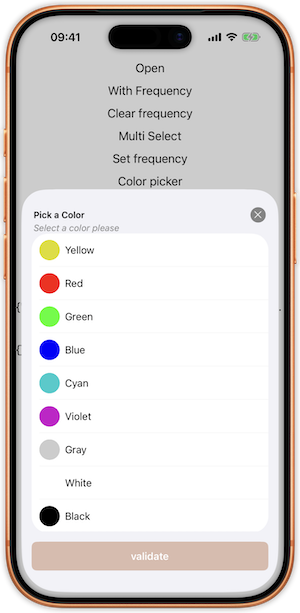
And voilà, I’ve got the result I was expecting (and what was displayed prior to 26.2)
Conclusion
The automatic application of liquid glass effects in iOS 26.2 can be
surprising, but with the UIColorEffect() solution, you
can regain control over your sheet’s appearance and maintain your
desired visual design.